




The End Of Dinner Debates.
Just Swipe & Dine.
What is Dinder?
Dinder helps people find a place to go out to eat by taking your accommodation, dietary, and preferential needs, finding restaurants near you that you are excited to eat at and are safe for you to eat at. So, all you have to do is swipe right on the places you want to go, left on the ones you don't, and Dinder handles the rest!
No matter who you are, your restrictions, or your accommodations, I believe you deserve a seat at the table. So come with me and together let's end dinner debates forever at Dinder. Just Swipe & Dine

Accommodations
And preferences
You only see restaurants that are safe for you and make you excited to go out to eat

Friending
And Grouping
Only show restaurants that are safe for, and have the preferences of, everyone in your group.

Swiping
And Matching
Transform dinner debates into being as simple as swiping right
How it works
STEP 1:
Send a dindering link to anyone you want to eat with
.png)
.png)
STEP 2:
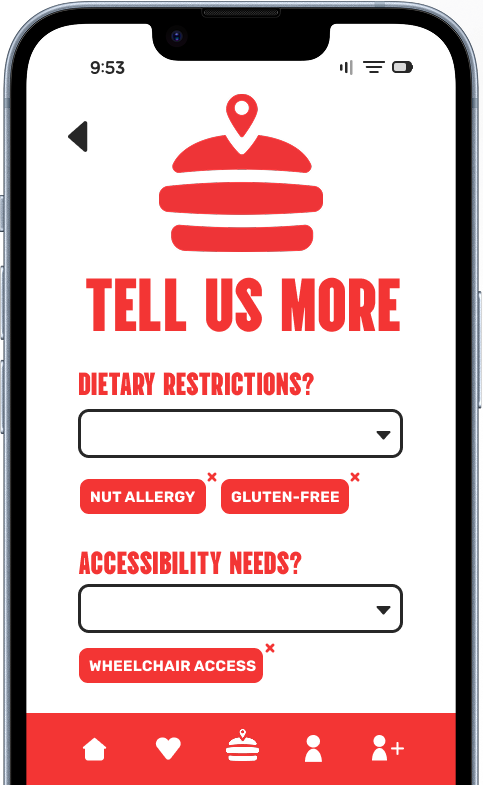
Input your accessibility, dietary, and preferential needs

STEP 3:
Swipe right on the restaurants you want to eat at, left on the ones you don't. and let Dinder handle the rest!



.png)
Interested in keeping up with progress?
Enter your email below to join our mailing list!
You may unsubscribe at any time!
Enter Email below to join the beta when it releases!
By entering your email you consent to receiving email updates from Dinder before and after the release of the beta test for updates on the status of Dinder. You may unsubscribe at any time.